Visual presentation helps a congregation follow worship songs, read Scripture passages, view announcements, and understand supporting media during a church service. Preparing these materials in separate documents, Bible applications, video players, and slide programs can make the operator’s work unnecessarily complicated, especially when the order of service changes.
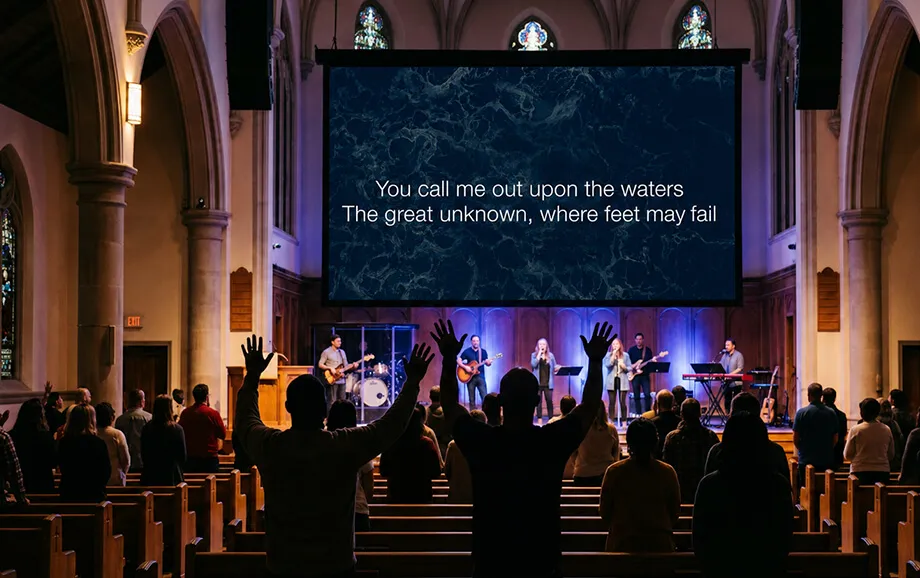
A dedicated church software solution brings songs, Bible passages, images, videos, and timers into one presentation workflow. The media team can prepare the required content in advance, arrange it in a service playlist, and control a separate live output shown on a projector, television, or LED screen.
What Is WorshipScreen
WorshipScreen is a free browser-based service developed for Christian churches, worship teams, and media volunteers. The project was originally created by a worship team to meet the practical needs of its own church and was later made available to other congregations.
The platform is designed to simplify the preparation and delivery of visual materials during services. It combines song lyrics, Bible passages, images, videos, and timers within a single web interface. Users do not need to open several unrelated applications or create a separate presentation file for every part of the service.
As worship service software, the platform supports both advance planning and real-time presentation control. A user can create a reusable song library, prepare Scripture passages, upload media, and arrange all materials in a playlist for a particular gathering.
The final presentation opens in a separate browser tab. That output can be shown on a projector, television, or LED screen, while the operator continues working from the control panel on a computer or phone. The congregation sees only the selected content rather than the administrative interface.
This workflow makes the service particularly useful for churches that need reliable song lyrics display without installing complex desktop applications or building each service from several disconnected files.
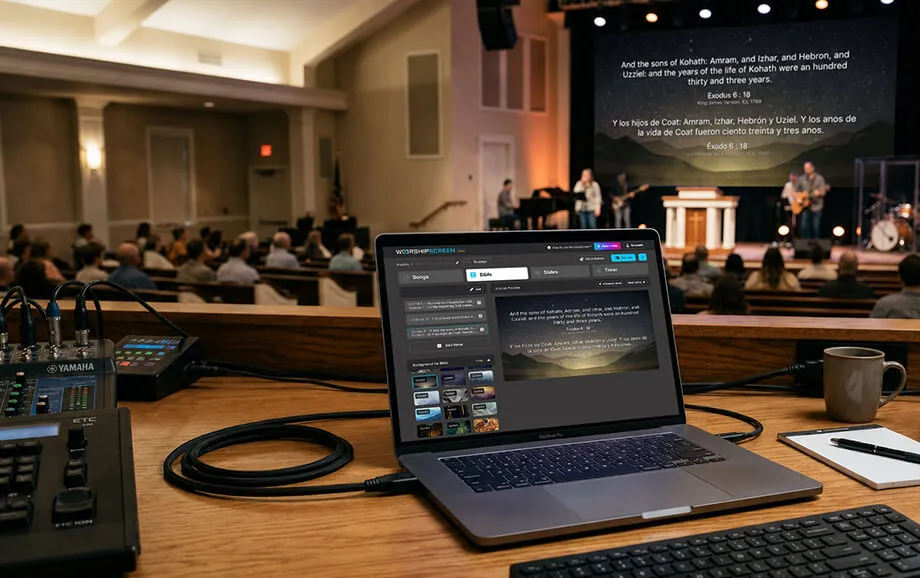
Key WorshipScreen Features
The platform focuses on the core presentation tasks that arise during worship services and other church events. Its functionality is designed around preparation, visual consistency, and the ability to make quick changes while a presentation is already running.
A typical workflow includes four stages:
Creating a library of songs and preparing Bible passages.
Adding songs, Scripture, images, videos, and other materials to a playlist.
Configuring backgrounds, fonts, colors, text alignment, and positioning.
Opening the presentation window and controlling the content during the service.
Because these tasks are managed within one browser-based environment, the media operator can spend less time switching between documents, video players, Bible applications, and conventional slide software.
Displaying Song Lyrics and the Bible
The song editor allows users to enter a song title and paste the complete lyrics into the system. Individual sections, such as verses, choruses, and bridges, can be marked within the text. The service then converts those sections into separate presentation slides.
This automatic structure reduces manual formatting. Instead of creating a new text box for every verse or chorus, the operator prepares the song once and saves it in the church library. The same song can later be added to other playlists without being recreated.
The song lyrics on screen can be presented over a selected image or video background. A church may apply one default background to the entire playlist or choose a separate visual design for a particular song. Font style, text color, alignment, and screen position can also be adjusted through the account settings.
Bible passages can be prepared before the service and placed in the required order within the playlist. During the presentation, the operator can move between verses and open a Scripture passage that was not included in the original plan.
This functionality supports Bible display on screen during sermons, Bible studies, prayer meetings, and other gatherings where a pastor or speaker may refer to an additional passage without advance notice.
Working with Images and Video
The platform supports photographs, uploaded videos, and YouTube links. These materials may be shown as standalone presentation elements or used as visual backgrounds for songs and other content.
Church teams can use media files for several practical purposes:
displaying announcements and event information;
supporting sermons or teaching sessions;
showing photographs, recorded messages, or promotional videos;
creating visual backgrounds for worship songs;
displaying a church logo between presentation sections.
Media files should be prepared with the output screen in mind. Images need a suitable aspect ratio and sufficient resolution, while video content should be tested in the browser before the service begins.
When text is placed over a photograph or moving background, readability remains the main priority. The operator should choose visuals with enough contrast and avoid backgrounds that make letters difficult to distinguish from a distance.
A default image can also be used during pauses. Instead of leaving the screen blank, the church may display its logo, an event title, or another neutral visual until the next item is selected.
Connecting to Screens and Devices
The service operates through a web browser and does not require a separate desktop installation. A computer can be connected to a projector, television, or LED display through the appropriate video output.
To begin the presentation, the operator opens the prepared playlist and launches a separate live output window. This window is moved to the display intended for the congregation, while the main control panel remains on the operator’s device.
From the dashboard, the user can select a song section, move between Bible verses, start a video, show an image, or activate a timer. Changes made in the control panel determine what appears in the presentation window.
Compatible televisions may also open the presentation through a built-in browser. However, browser support and device performance can vary, so the complete setup should be tested before the event.
Because the platform is web-based, a stable internet connection is required. This is especially relevant when the playlist includes YouTube videos or other online materials. Churches should also confirm the correct screen resolution and display mode before the service starts.

Who WorshipScreen Is For
The service is intended for Christian communities that need a focused presentation system without the complexity of professional broadcast software. It can be used by both small congregations and established media teams, provided that the available equipment meets the basic browser and display requirements.
This church software can be useful for:
volunteer-led churches without a permanent technical department;
worship and media teams preparing weekly services;
pastors and ministry leaders presenting Scripture and supporting visuals.
The interface is designed around familiar actions rather than advanced production terminology. This makes the platform accessible to volunteers who may not have extensive experience with multimedia systems.
For Worship Teams and Ministers
Worship teams can prepare a complete sequence of songs before the service, select appropriate backgrounds, and arrange the material in the expected order. Songs saved in the library remain available for future playlists, which reduces repetitive weekly preparation.
As worship presentation software, the platform helps musicians, ministry leaders, and media operators work with the same planned sequence. The playlist acts as a practical outline containing the lyrics, Bible passages, and visual materials required for the gathering.
The operator can also respond to changes during the service. A song may be added to the playlist, a text error can be corrected, or an additional Bible passage can be opened without rebuilding the complete presentation.
This flexibility is valuable when the order of worship changes, the speaker refers to an unplanned verse, or a ministry leader decides to repeat a chorus or return to an earlier section.
For Organizing Church Events
The platform is not limited to regular Sunday worship. Separate playlists can be prepared for youth meetings, Bible studies, conferences, prayer gatherings, seminars, holiday services, and ministry events.
Each playlist can contain its own combination of songs, Bible passages, images, and video content. Keeping materials separated by event makes it easier for the operator to locate the correct files and reduces the risk of opening unrelated content.
The built-in timer can be used before an event or between individual program segments. It supports a countdown of a selected duration and a countdown to a specific time. A photograph, video, or YouTube background may be displayed together with the timer.
In this context, worship service software becomes a practical tool for organizing visual communication across different church activities, not only during musical worship.
Benefits of Using WorshipScreen
The platform is distinguished by free access, browser-based operation, and a workflow created specifically for church presentations. These characteristics lower the financial and technical barriers that may prevent smaller congregations from using structured visual support.
The benefits are especially noticeable when services are managed by volunteers or when the church does not have a dedicated media computer with specialist presentation software installed.
Free to Use
The service is available free of charge, and the public website does not present paid subscription plans. Development is supported through voluntary donations rather than mandatory licensing fees.
Free access allows churches to introduce song lyrics display, Bible passages, and media presentations without adding a recurring software expense to the ministry budget. It also gives the team an opportunity to test the workflow during real services before changing its broader technical setup.
The absence of a subscription fee does not remove the need for suitable equipment. A church still requires a compatible device, a modern browser, an output screen or projector, the necessary cables or adapters, and dependable internet access.
Simple Setup and Operation
The initial workflow consists of registration, content preparation, playlist creation, and connection to the output display. No desktop application needs to be downloaded or installed.
Automatic slide generation simplifies the preparation of song lyrics on screen. Once the text has been entered and divided into logical sections, the service creates the corresponding slides. The operator can then adjust the visual settings without manually formatting every individual screen.
Saved songs can be reused in future playlists. This reduces routine preparation and helps maintain a consistent visual style between weekly services and other church events.
The service has a relatively low learning threshold, but an internal workflow is still useful. Churches should use consistent song titles, section labels, file names, and background formats so that another volunteer can manage the presentation when the regular operator is unavailable.
Convenient Presentation Control
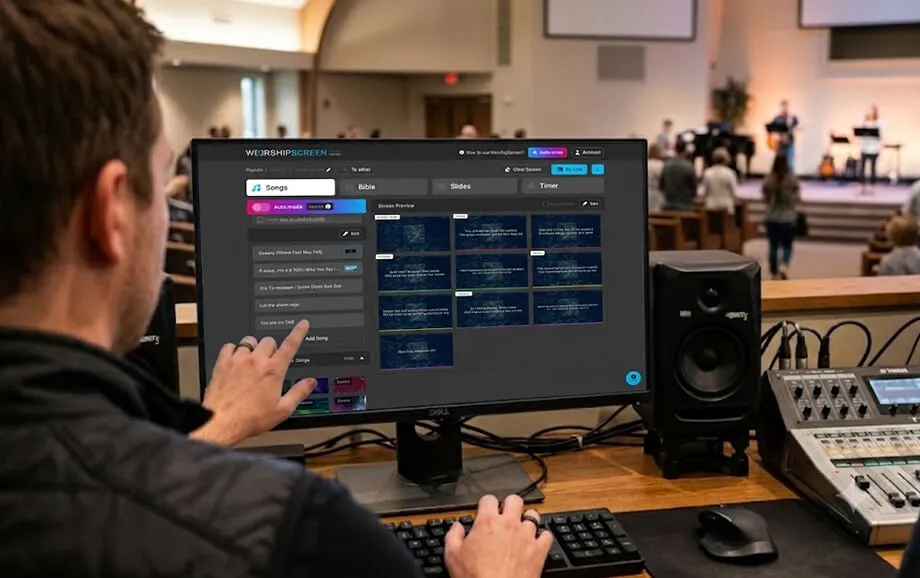
During a live service, the operator can manage songs, Bible passages, images, videos, YouTube links, and the timer from one control panel. The presentation output remains open in a separate browser window.
This separation is important because it prevents the congregation from seeing editing tools, file lists, or account settings. Only the selected material appears on the projector, television, or LED display.
The platform also supports adjustments during the service. The operator can correct song text, choose another section, open an additional verse, or switch to a prepared media file without closing the live presentation.
Several functions are particularly useful in a live environment:
Automatically generated song slides allow the operator to move quickly between verses and choruses.
Live text editing makes it possible to correct a visible error without recreating the playlist.
The timer helps coordinate the beginning of a service or the transition between program elements.
For reliable Bible display on screen and media playback, the playlist should be reviewed on the actual presentation equipment before the congregation arrives. Every song, passage, image, video, and external link should be opened at least once.
This final check helps identify unreadable text, incorrect formatting, broken links, unsuitable backgrounds, or display configuration problems before the service begins.
Try WorshipScreen Today
A church can begin by creating an account, building its song library, and preparing a playlist for the next service. Bible passages, photographs, videos, and backgrounds can then be arranged in the required order.
As free worship presentation software, the platform provides the main tools needed to organize church visuals in one browser-based workspace. It supports advance preparation while allowing the operator to make practical adjustments during a live gathering.
Register, connect the presentation device, and start using song lyrics display, Scripture passages, and media content to make each part of the service easier for the congregation to follow.